For game-night hosts
A shortcut for your table
Put a card beside the games. Anyone can scan it to pick a starting player, without an account or an app to install.
Print two game-night cards
A single page with two cut-out cards. Each has a QR code and the site address, so guests can scan it or type the address themselves.
Download the table cardsPDF · 1 page · US Letter · 5 KB
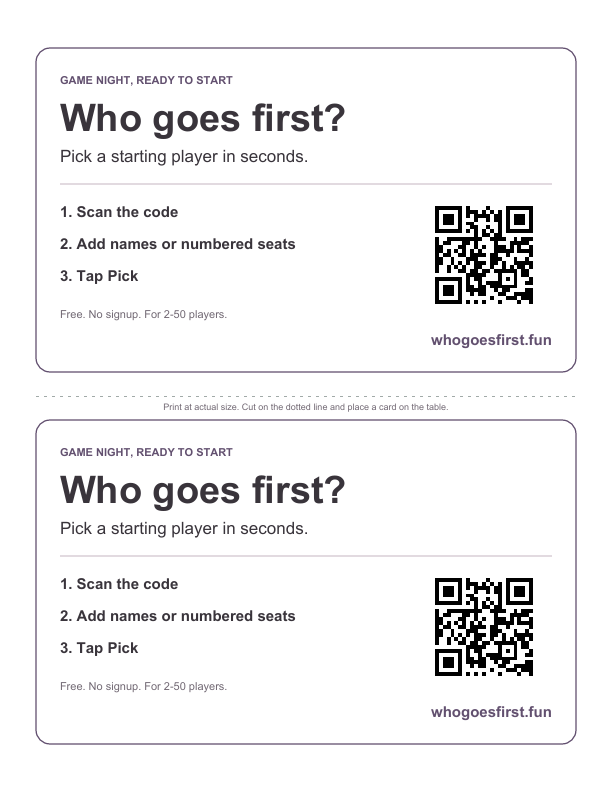
From printer to first turn
- Print in portrait. Use US Letter at actual size. For A4 paper, choose fit to page. Black-and-white printing works too.
- Cut out the cards. Cut the sheet in two along the dotted divider and place a card where your group can reach it. Try scanning it before guests arrive.
- Scan and pick. Open the first-player picker, add 2–50 numbered seats or names, then tap Pick. Each listed entry has the same chance.
For a club, café or casual game night
You’re welcome to print the cards for your tables or share the PDF with other hosts. Keep the QR code and site address visible. The code opens the picker; it does not contain anyone’s names or a saved result. Guests need an internet connection to open the site.
Before choosing randomly, check whether your game has its own starting instruction. Browse the sourced game rules, or read three ways to choose who goes first. For a playful alternative, try an original house-rule question.
Try the picker